reWASD, Legacy Licenses, and Recent Authorization Changes
With the release of reWASD 9.4.0, we introduced several changes related to authorization and legacy license usage.
Starting with this update, reWASD now requires account authorization when using legacy license keys. This change affects not only the current version, but older reWASD builds as well.
While legacy licenses themselves remain fully valid, older standalone activation methods are gradually being phased out in favor of a more secure account-based system.
As part of this process, we reviewed multiple internal systems and legacy authorization mechanisms to better align them with current security standards and reduce potential vulnerabilities.
For most users, the transition only requires signing into the reWASD account their license is linked to once again. However, we understand that the update also raised questions regarding:
- legacy license support,
- older reWASD builds,
- and compatibility with outdated operating systems.
In this article, we’d like to clarify what exactly changed, why these changes were introduced, and what users should expect going forward.
Why These Changes Were Introduced
Recently, Kaspersky reported a security incident involving a compromised DAEMON Tools Lite infrastructure.If you haven’t heard about this case, you can find more details here:
https://blog.daemon-tools.cc/post/security-incident
Although reWASD itself was not affected, the incident highlighted several internal areas requiring additional review, hardening, and modernization. These issues were resolved internally as part of a broader infrastructure and security audit across Disc Soft products and services.
As a result, we reviewed multiple legacy workflows and authorization-related components to reduce potential risks and better align them with current security standards.
As part of this audit, we decided to gradually move away from older standalone activation methods in favor of a more secure account-based authorization system.
What Exactly Changed
Older reWASD versions relied on activation methods created before account-based authorization became part of the application.
As a result of the recent infrastructure updates, builds older than reWASD 8.0.0 may no longer be able to complete legacy license authorization correctly.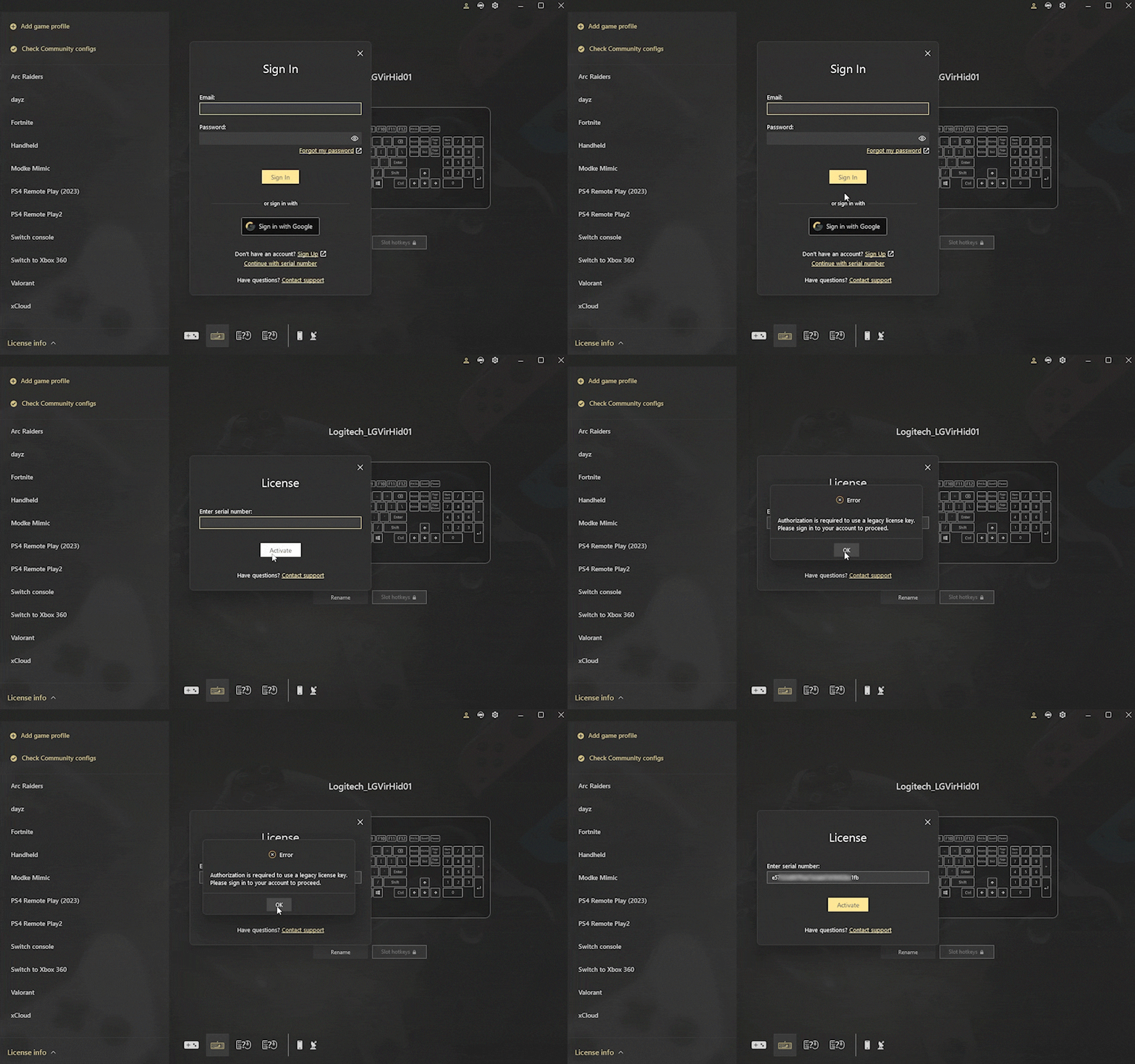
To continue using reWASD with a legacy license, we strongly recommend updating to the latest available version - reWASD 9.4.0.
Because of the recent authorization changes:
- standalone legacy license authorization is gradually being phased out,
- legacy license keys now require account authorization,
- and older builds may require users to sign in again or update to a newer version of the application.
Most importantly:
Your legacy license has not been revoked or removed.
Legacy licenses continue to work and remain available in the reWASD account they were originally linked to. In most cases, the issue is related to outdated authorization mechanisms in older application builds - not to the license itself.
Users attempting to activate reWASD using only a legacy license key may encounter the following message:
“Authorization is required to use a legacy license key.
Sign in to your reWASD account to proceed.
We recommend updating to reWASD 9.4.”
So what should you do next?
Simply signing into the reWASD account your license is linked to will resolve the issue immediately. However, depending on your current reWASD version and operating system, some additional steps may be required.
What We Recommend
For the most stable and future-proof experience, we strongly recommend updating to the latest version of reWASD available on the official website.
Current recommended version:
reWASD 9.4.0
Updating to the latest version resolves authorization-related issues immediately.
If You Want to Stay on an Older Supported Version
Some users may prefer to continue using an older reWASD build.
If your application becomes stuck after the authorization error appears and does not return to the login screen, you can try removing the local license cache file manually:
C:\ProgramData\Disc-Soft\reWASD\license.dat
After deleting this file:
- Launch reWASD again
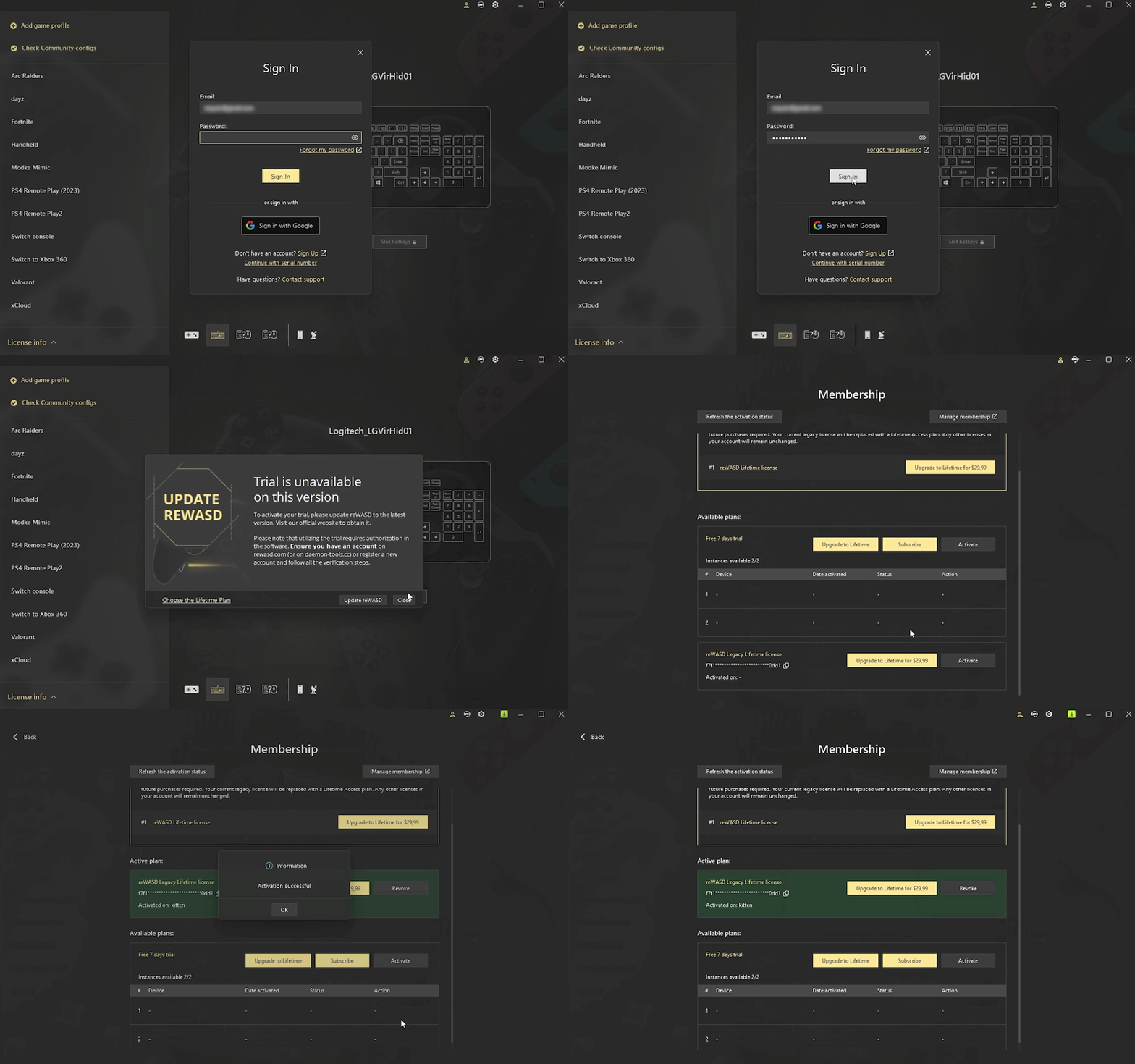
- Sign in to the reWASD account your license is linked to
- Complete authorization again
Please note that this workaround may not function correctly on reWASD builds older than 8.0.0.
Windows 7 / Windows 8 and Older Systems
Another group affected by these changes includes users still running Windows 7, Windows 8, or earlier operating systems.
The last reWASD version compatible with these operating systems was reWASD 6.7.1.
However, versions this old were created before the modern account authorization system introduced in reWASD 8.0.0. As a result, older builds may no longer be able to complete license authorization correctly under the updated security infrastructure. In practice, this means there is currently no reliable way to activate legacy licenses on these outdated operating systems.
Additionally, Windows 7 and Windows 8 are no longer officially supported by Microsoft and no longer receive modern security updates. For this reason, our main recommendation is to migrate to a newer Windows version supported by Microsoft whenever possible.
What This Means for Legacy License Users
These changes are part of our ongoing efforts to modernize authorization systems and improve long-term security across Disc Soft products and services.
While the transition may cause some inconvenience, especially for users accustomed to standalone license-key activation, legacy licenses remain fully valid and continue to work as intended.
For the most stable experience going forward, we strongly recommend using the latest version of reWASD available on our official website.
FAQ
Do I need to purchase a new Lifetime access to continue using reWASD?
No.
Legacy licenses remain fully valid and continue to work. The main change is that older standalone activation methods are being replaced with account-based authorization.
To continue using your existing license, simply sign in to the reWASD account your license is linked to using a newer reWASD build (8.0.0 or newer, preferably reWASD 9.4.0).
Your existing access and the features covered by your license remain available in your account.
Do I need to upgrade my Legacy License to the latest Lifetime access?
No.
Upgrading a legacy license is completely optional. If you are satisfied with the functionality already covered by your current legacy license, you can continue using it without purchasing an upgrade.
What is the purpose of upgrading a Legacy License to the latest lifetime access?
Upgrading a legacy license is optional. Users who upgrade receive access to newer Advanced Features not covered by legacy licenses. If your current functionality already meets your needs, you can continue using reWASD as usual with your existing access.
Why do I need to update the version if everything worked before?
Older reWASD builds relied on authorization methods created before account-based sign-in became part of the application. As of now, reWASD versions older than 8.0.0 are no longer able to complete legacy license verification correctly.
Versions starting from reWASD 8.0.0 can still be used through account authorization by signing into the reWASD account your license is linked to.
At the same time, each new reWASD release includes ongoing improvements related to application stability, compatibility, device support, security, and overall user experience. Because of this, continuing to use very old builds may no longer provide meaningful advantages in the long term.
For the most stable and future-proof experience, we strongly recommend using reWASD 9.4.0.
What will happen to my configs and settings if I update reWASD?
Nothing should happen to your existing configs, mappings, or settings after updating to a newer reWASD version.
Your local reWASD config files will automatically migrate to the newer release during the update process, so in most cases you can continue using the application exactly as before after signing into your account.
I logged into a newer reWASD version and now see an active trial. Why?
If you have never used reWASD 8.0 or newer before, the application may automatically activate a trial for the newer access model after you sign into your account.
During this trial period, all newer Advanced Features are temporarily available.
Once the trial ends, your account will automatically return to the license and feature set covered by your existing legacy access. If this does not happen automatically, open the Membership section in reWASD and make sure your legacy license is activated there. If necessary, activate it manually from the Licenses Tab.
Your legacy license remains active, and no additional action is required. If the functionality already included in your current license meets your needs, you can simply continue using reWASD as usual after the trial expires.
I’m still using Windows 7 / Windows 8. What should I do?
The last reWASD version compatible with Windows 7/8 was reWASD 6.7.1.
However, these versions were created before the modern account-based authorization system introduced in reWASD 8.0.0 and may no longer be able to complete legacy license verification correctly. Because of this, there is currently no reliable way to activate legacy licenses on these outdated operating systems.
Additionally, Windows 7 and Windows 8 are no longer officially supported by Microsoft and no longer receive security updates. For the best compatibility, stability, and security, we strongly recommend migrating to a newer supported version of Windows whenever possible.
I don’t remember which email address my license is linked to. What should I do?
If you no longer remember which email address your reWASD license is linked to, please contact the reWASD support team and we’ll help you restore access to your account and locate your license.
I forgot my reWASD account password. What should I do?
If you forgot your account password, simply use the password recovery form available on the sign-in page.
You can reset your password using the email address linked to your reWASD account.
I have multiple licenses in my reWASD account. How does authorization work in this case?
If your reWASD account contains multiple licenses, simply sign in to the application using your account credentials as usual.
You can authorize reWASD on as many PCs as you have licenses in your account, and choose which license to activate on each device through the Membership section of the application.
You may also like
Summer Is Fading… But We’re Just Getting Started
.png)