reWASD 9.5: Steam Controller beyond Steam and a new way to control analog keyboards
reWASD 9.5 is one of those releases where the two biggest additions are very different, but share the same idea: giving you more control over the hardware you already use.
This time, we’re adding full support for the new Steam Controller (2026) and introducing Analog Key Control, a new Advanced feature built specifically for analog and magnetic keyboards.
Take the new Steam Controller beyond Steam
The new Steam Controller is packed with input options, but one of the biggest questions around it has been what happens once you step outside the Steam ecosystem.
With reWASD 9.5, you can connect the controller directly to reWASD and build your own configs without being tied to Steam or a Steam Machine.
Support covers the full controller: trackpads, four back grip buttons, Grip Sense, magnetic sticks, triggers, gyro, accelerometer, and the rest of its controls and sensors. You can connect it through USB, Bluetooth, or the wireless dongle and use those inputs as part of your reWASD configuration.
Grip Sense is an input of its own
One detail deserves a little more attention: Grip Sense.
The new Steam Controller uses capacitive sensors in its grips to detect whether you’re actually holding the controller. Valve primarily presents this as a convenient way to activate or deactivate gyro, but Grip Sense itself is an assignable input.
In reWASD, we expose it as a separate control, rather than simply treating it as part of gyro behavior. That means you can include Grip Sense in your own config and decide what should happen when the sensor is activated.
So, for example, Grip Sense does not have to exist only to switch gyro on and off. It becomes another input you can build your configuration around.
Meet Analog Key Control
The second major addition in reWASD 9.5 is for a completely different type of hardware.
Traditional keyboards only tell software whether a key is pressed or released. Analog and magnetic keyboards can report how far the key has travelled, giving us much more information to work with.
With our new Analog Key Control Advanced feature, reWASD can use that data directly inside your configs.
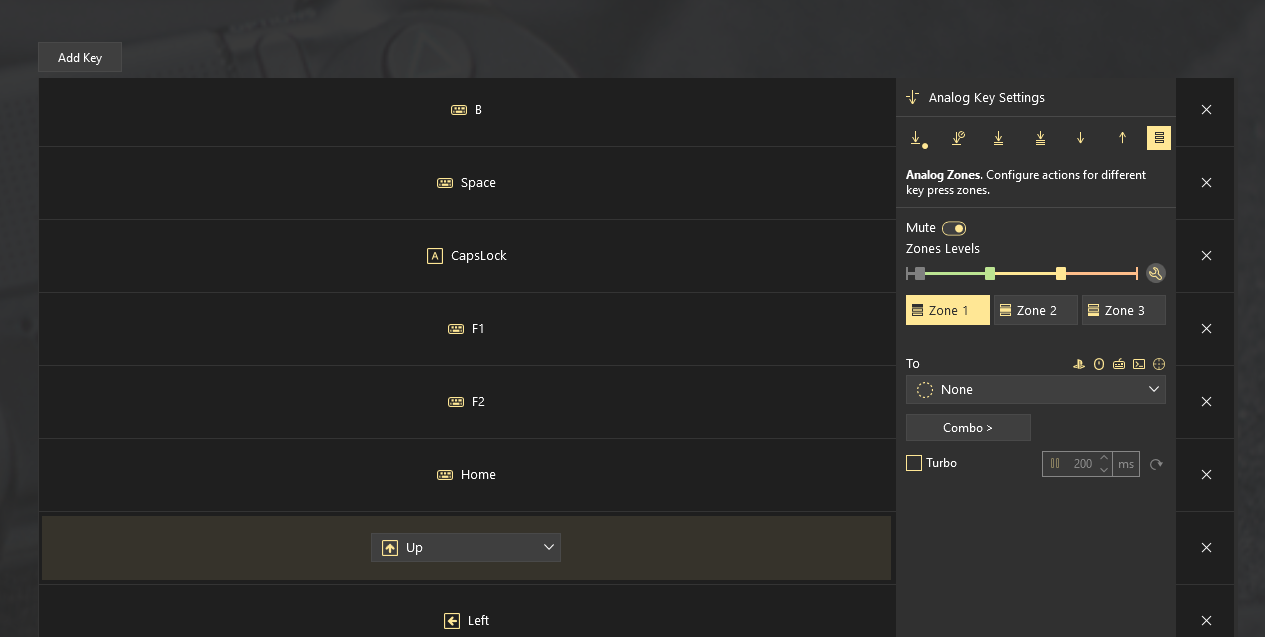
You can switch a key between digital and analog behavior, change its actuation point, adjust deadzones and Rapid Trigger sensitivity, assign several actions to different press depths, or turn keyboard keys into analog controls.
One key, several actions
This is probably the easiest way to understand why analog input is interesting.
Instead of every press being simply OFF → ON, the full key travel can become usable space.
A light press could trigger one action, pressing further could activate another, and a full press could do something else entirely.
That gives you a way to put several actions on one physical key without adding another modifier or shortcut.
Keyboard movement can actually become analog
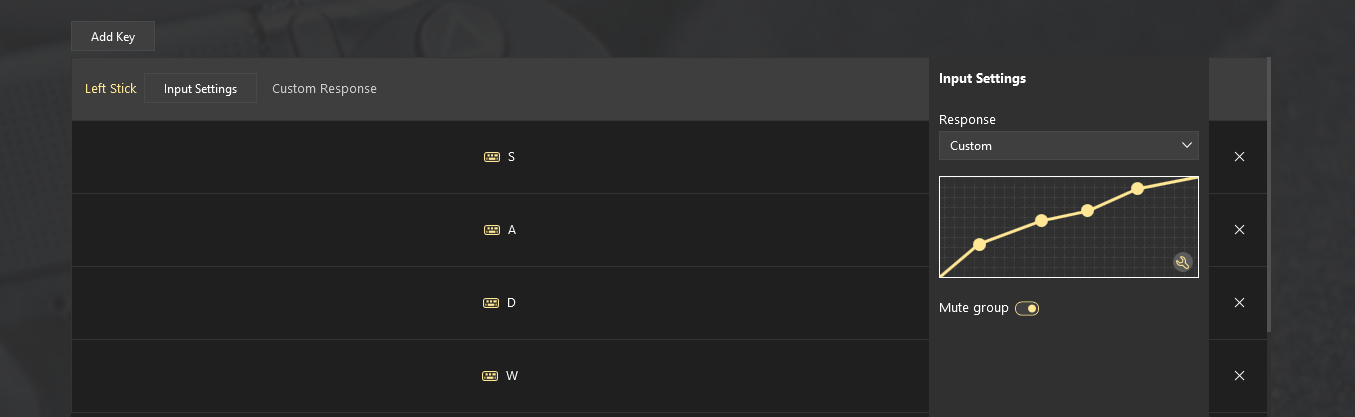
Analog Key Control also lets compatible keys send analog output.
So instead of WASD always behaving like four digital directions at 100% input, you can use press depth to control analog movement through a virtual stick.
A lighter press can mean slower movement, while pressing the key further increases the output.
Set the key response you want
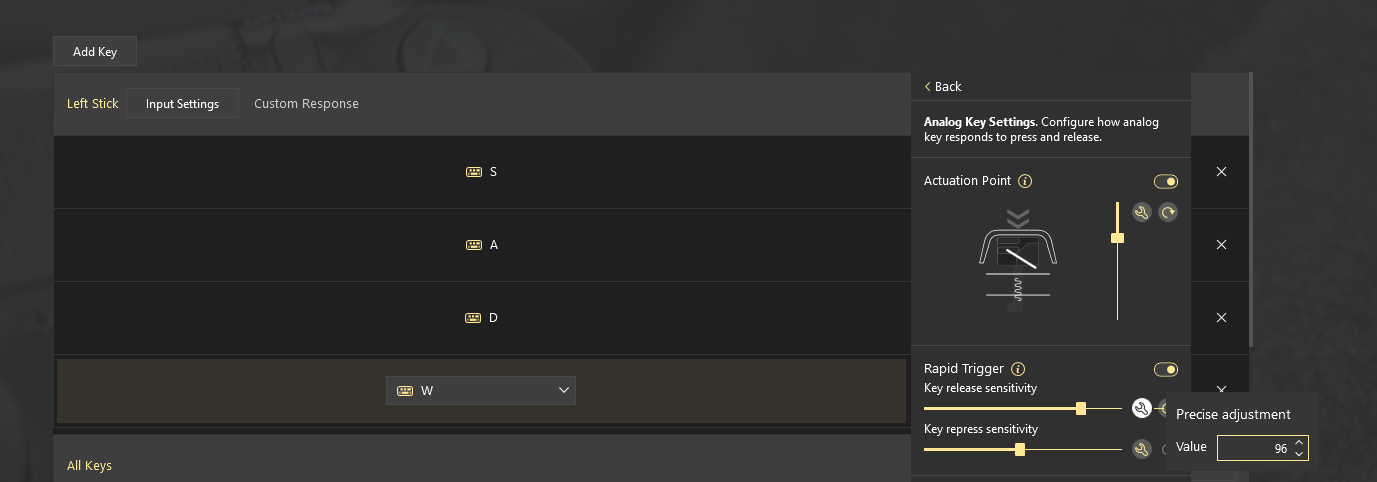
You can also tune the way a key reacts before you even start mapping actions.
Actuation Point determines how far the key needs to travel before the press becomes active.
Deadzone lets you ignore a small part of the key travel, helping prevent unwanted input from very light touches.
And Rapid Trigger lets the key reset based on its movement rather than requiring it to return to a fixed reset point, making repeated input faster and more responsive.
Which analog keyboards work with reWASD 9.5?
Analog keyboards don’t all expose their input in exactly the same way, which means adding support is a little different from working with a regular keyboard.
For the first release, we personally tested and fine-tuned Analog Key Control with:
- Wooting 80HE
- Wooting Two HE
- Razer Huntsman V3 Pro 8KHz
- Razer Huntsman V3 Pro Mini
- Razer Huntsman V2 Analog
Based on the way Wooting devices expose their analog data, we currently expect Analog Key Control to work across the Wooting analog keyboard lineup, although the models above are the ones we have tested ourselves.
Razer is a little more complicated. During development, we found that different Razer keyboards can report their analog input separately, so additional models may need individual verification or implementation.
If you have another model, try it and let us know. In some cases, we may even be able to add support remotely with your help, without having the keyboard physically in our office.
For supported Razer keyboards, Razer Synapse must be installed and running for reWASD to receive analog key data in Analog Mode.
Analog Key Control is only getting started
9.5 is the first release of Analog Key Control, not the end of its development.
We’ll continue expanding keyboard support, testing additional models and bringing more vendors into the list. SteelSeries is already one of the brands we’re looking at next.
And this is where we’d really like your help!
If you use an analog or magnetic keyboard that isn’t on the list, tell us the brand and exact model. The more we know about what our community actually uses, the easier it is to prioritize what comes next.
You may also like
Summer Is Fading… But We’re Just Getting Started
.png)