How to enable reWASD Double movement in Fortnite?
In November 2020, there were reports of changes towards Double movement for PC users: seems like the ability to map 2 keys to one action within in-game settings was removed. Times change though, as for one of the last posts on April 2021 from Fortnite team:
The spirit of our rules allow for players to reconfigure keybinds in a way that wouldn’t be possible inside the game, including double-movement on keyboards.
Fortnite Competitive Rules Clarification, Fortnite Team
This is the reason we decided to make this post: if you want to try Fortnite Double movement, do it right, and let our team give you some suggestions! Here’s a brief table of contents:
- Double movement… who?
- Can I download a config?
- Can I make a reWASD Double movement config myself? (Spoiler: yes)
- Some important tips
- reWASD Double movement config doesn’t work for reasons unknown, I need help :(
Since we are configuring a reWASD Double movement config, you will definitely need the software installed on your PC:
What is double movement in Fortnite?
Essentially, double movement is a mix of two inputs: keyboard (A and D) and controller (Left stick Left and Right). This helps players change the angle their character uses to run: if you use W+A or W+D, you run with a 45° angle. When using W+A+Left Stick left and W+D+Left Stick right, the angle changes to 30° towards the horizontal axis. One of the main benefits is a slightly better view on your surroundings, and a possibility to build items alongside your moving trajectory. That could save you from a bullet or two :)
Regardless of the benefits, it’s up to you to decide whether you need Fortnite double movement or not, or what configuration you would like to use. We will help you with some troubleshooting information, and you can try this in game, just to see if this playstyle fits you.
What config should I download?
Our community has plenty of reWASD Double movement configs to choose from, make sure to visit the Fortnite community page. However, it appears that most of the configs that you will find there have a slightly different setup. If we jump into details, our users seem to remap the whole WASD to the Left stick (W and S unmapped, so you get only controller input from them; A and D not unmapped, so it comes out as A+Left Stick left and D+Left Stick right).
We ran some tests, and it seems like the reWASD Double movement config we created permits your character to turn side to side a bit snappier. I think the explanation for that is that you don’t have that unnecessary amount of acceleration: since W and S are acting just like the controller stick, your character may take longer to turn from side to side. In the solution we offer, you have WASD acting normally, plus A and D having controller movement, which wins you that beneficial angle.
I want to make a Fortnite Double Movement config on my own, any advice?
That’s quite an easy thing to do as well. Basically, what you need is to add Left stick left mapping to A and Left stick right mapping to D, without unmaps. Here are the detailed steps on creating your Fortnite double movement config:
- Choose a keyboard device in reWASD’s bottom-left corner
- Click on the menu in the top-right corner to Add a new Game profile (in this case the config is created automatically), or choose an existing one (and add a new config by pressing the + sign in the upper-left corner)
- Now, click Add to create 2 new mappings for your keyboard
- Set A on the left side, and assign Left Stick Left to it, make sure Unmap button in NOT highlighted
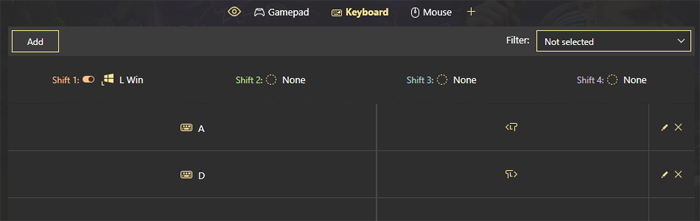
- Similar step for the D button: choose D on the left side, and add Left Stick Right on the right. Check the Unmap box, it should not be highlighted. This is how your config should look like:
- Finishing touches: let’s make sure you get the least acceleration possible. Click on the Xbox / PS icon on the top of reWASD Window to open the Virtual controller settings. Now, switch to Left Stick, drag the grey Deflection slider almost all the way to the right, max out Initial Speed, and minimize Acceleration:
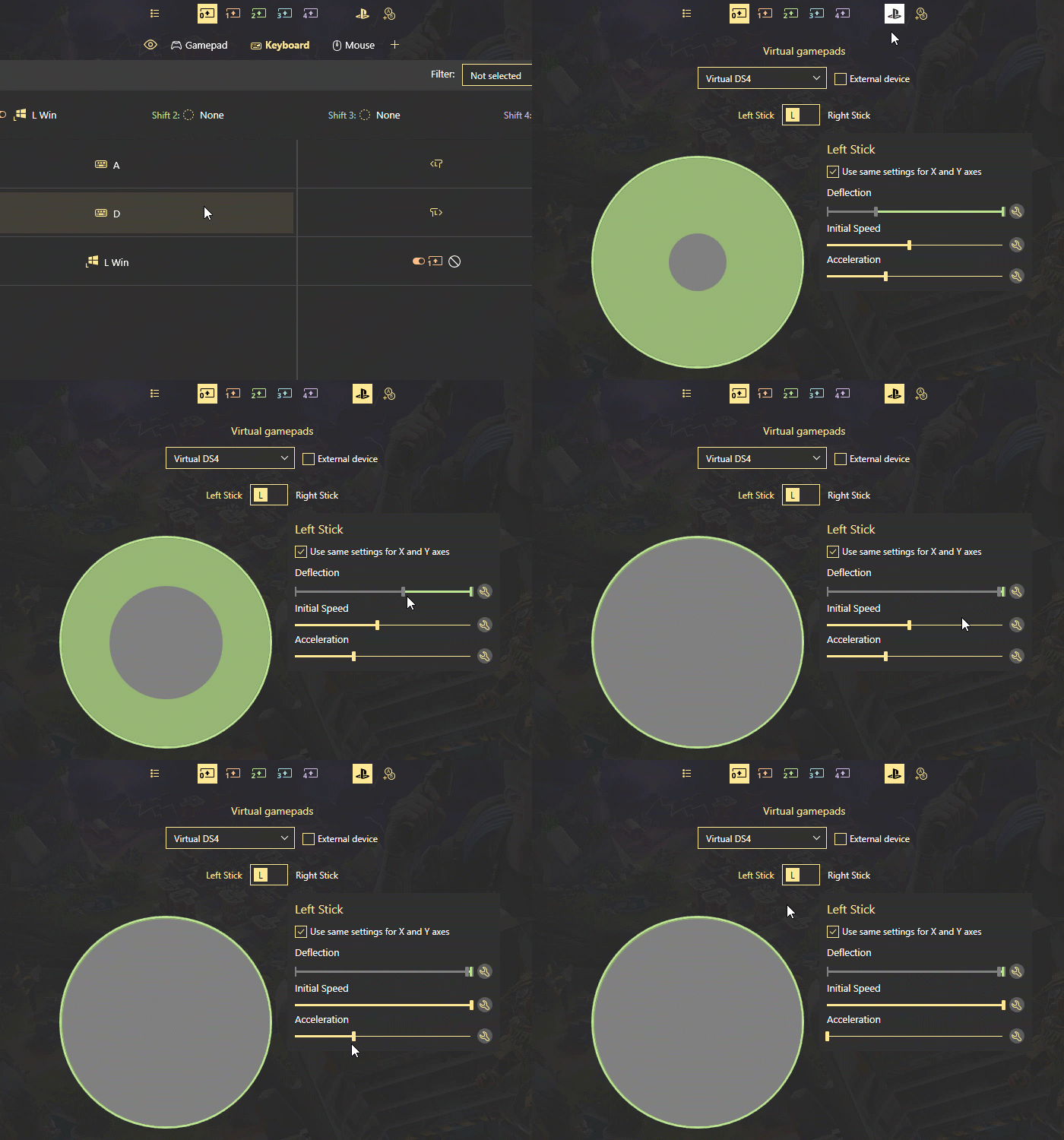
Done! Now, you can press Apply, and launch the game.
This setup I described above required reWASD Basic license only.
What if I want to use a regular layout mid-game?
Okay, bet, you’ll need a Shift modifier for that, preferably Toggle Shift even:
- While Keyboard sub-config is opened, click on Shift 1 icon (on the top of reWASD window)
- In Shift 1: list choose the key that you want to use as a switch, and click Toggle box near it
- Now, pick A and D mappings one by one, and choose Do not inherit option from the list:
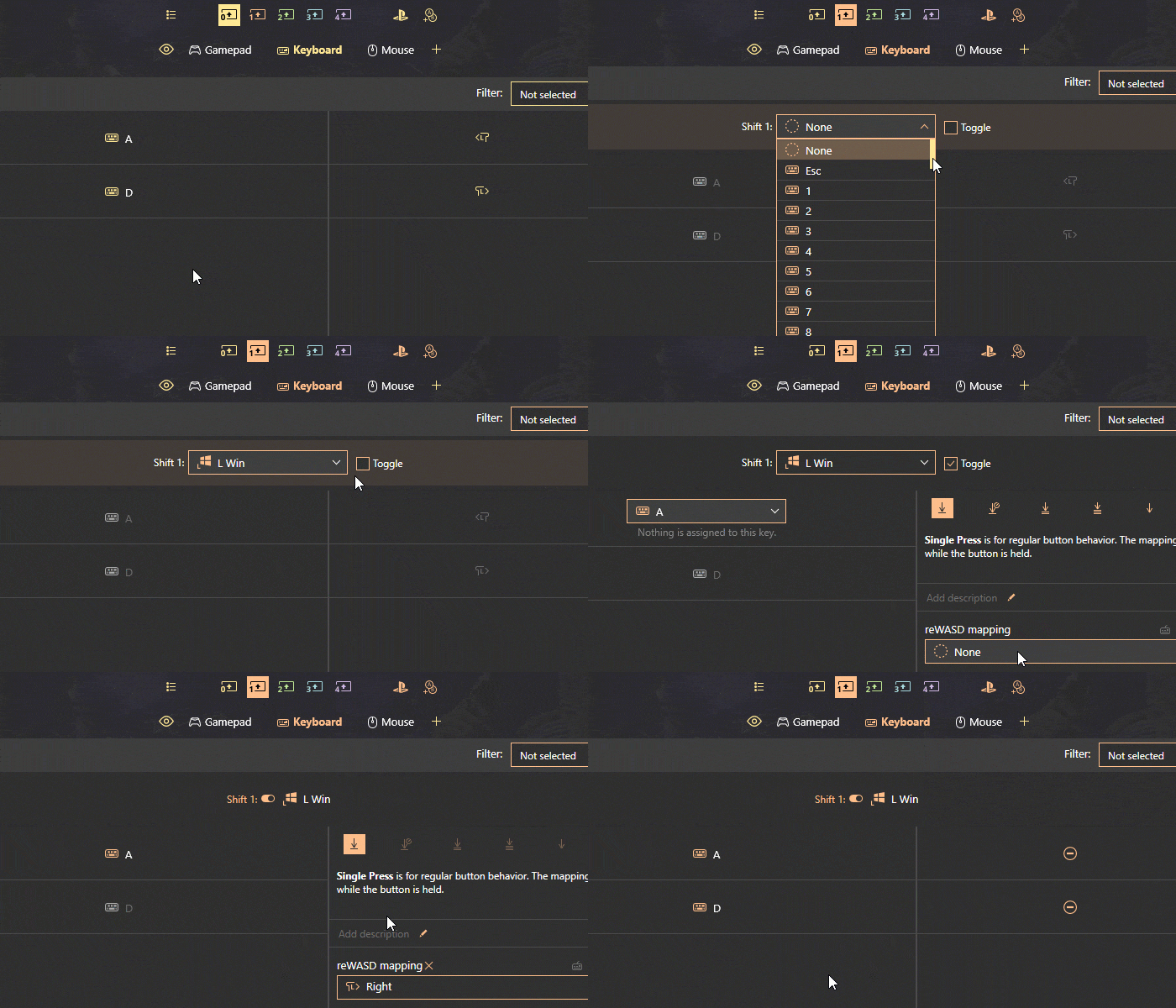
- To prevent your Shift modifier from firing when you’re pressing it to change the layout, add its mapping to Main layer, and Unmap it:
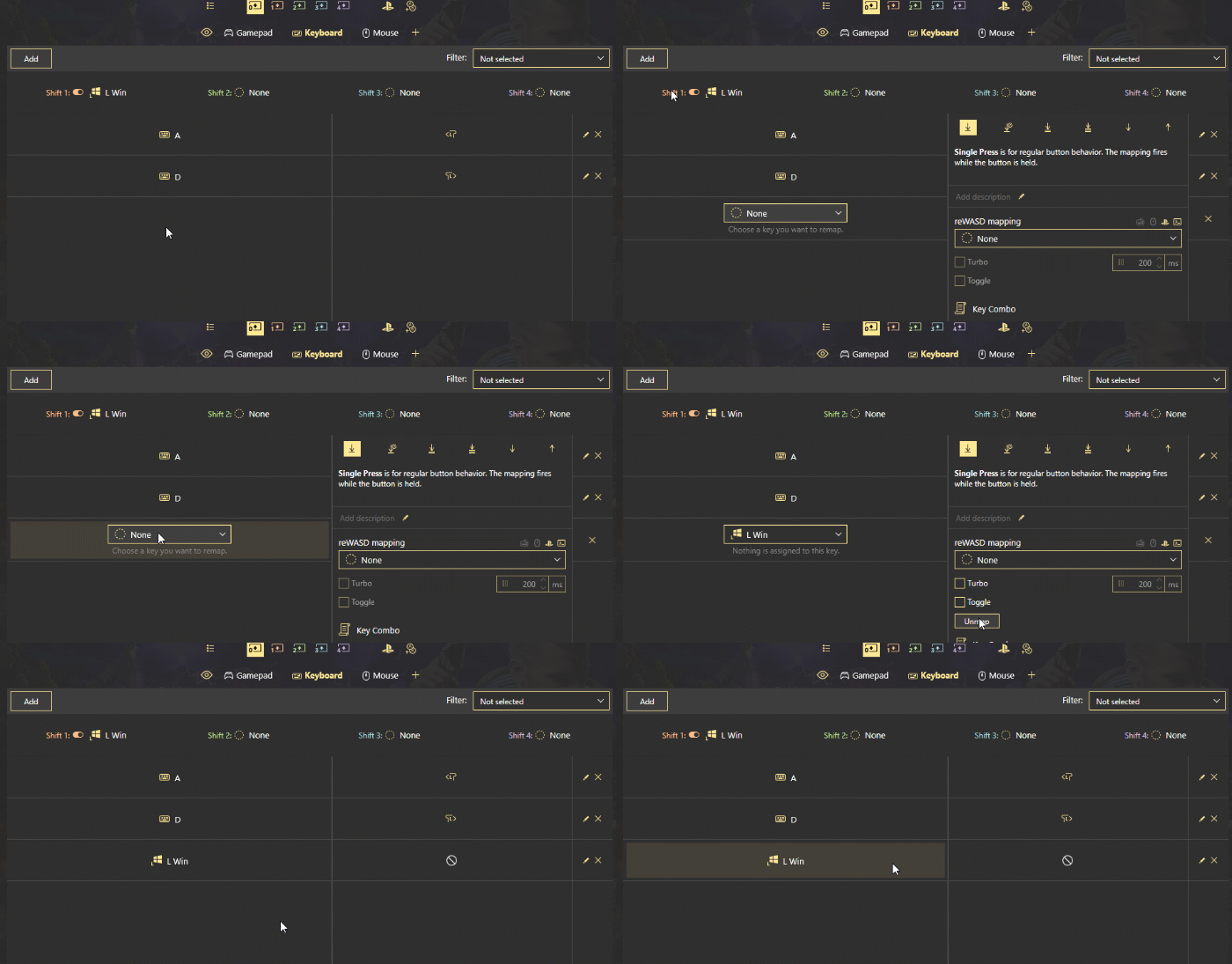
All done! Apply and test in game :) I’ve also made a reWASD Double movement config, and Left Windows key is a Shift modifier in it. Make sure to download it and test in game!
Toggle Shift functionality requires a purchased Rapid Fire feature along with the Basic license.
My W and S keys are not working after I Apply the config, what do I do?
If you have imported the config from the community, make sure to check that the config has a Shift modifier (check the paragraph above to learn how to add one). Or, you can use Ctrl+Alt+Del shortcut to turn remap off, but you’ll need to reopen reWASD and reapply the config for it to work again. With Shift mode, the config is applied all along, which is comfy.
Try to use Slots too, when you swap to another Slot where nothing is applied, you use the native layout. Autodetect is a great feature to solve this too, enable remap when Fortnite is in focus only.
I don’t want the input to switch while I’m in game
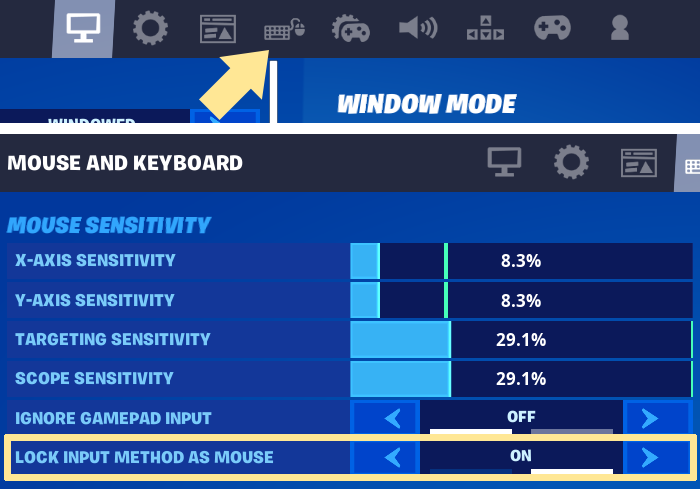
Get into Fortnite settings — Mouse and Keyboard tab. Make sure Lock input method as mouse setting is enabled:
reWASD Double movement does not work in Fortnite
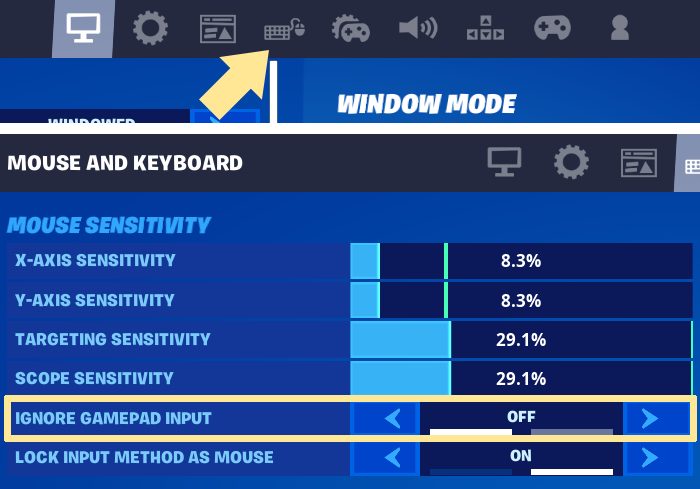
- Open Settings in Fortnite, get to Mouse and Keyboard tab. Make sure the Ignore gamepad input option is disabled, and re-check in game:
- Try to change the Virtual controller type in reWASD: click on Xbox / PS icon on the top of reWASD window, and change the Virtual Gamepad to another one:
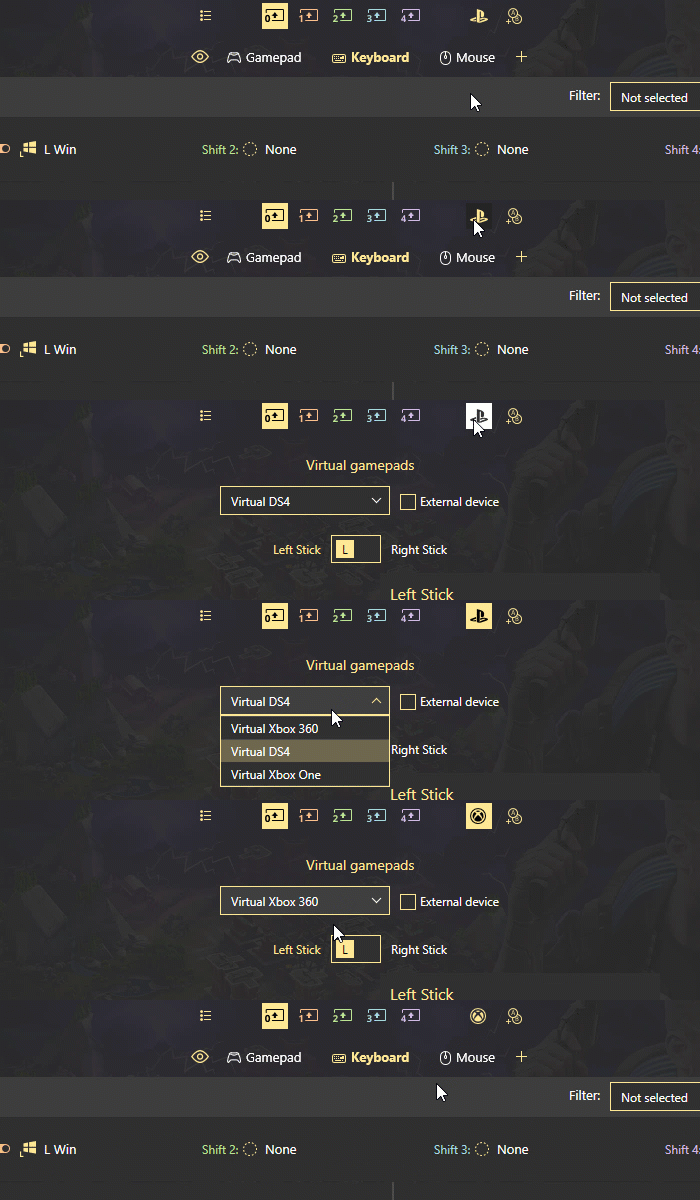
- Restart the game after you turn remap on. Thus, Apply the config, then press Launch in Epic Games Launcher
- Let’s see if reWASD emulates the controller in your system correctly. Click Win+R, type in joy.cpl, press Enter. Keep this Game Controllers window open, get back to reWASD, and Apply the reWASD Double movement config to your keyboard. Check back to the Game Controllers window, are there any controllers in there? Here’s how each of reWASD Virtual controllers must appear:
- Virtual Xbox 360 shows up as Controller (XBOX 360 For Windows)
- Virtual DS4 shows up as Wireless Controller
- Virtual Xbox One shows up as Bluetooth XINPUT compatible input device
- If you see it, double-click the controller, and press the keys that you remapped in reWASD. You should see the Left Stick moving in the tester
- If you don’t see any controllers when Remap is ON, try to change the Virtual controller type in reWASD and reapply the config
- If you see the controller, press the keys, but nothing is happening in the tester, use Detection mode to make sure you have applied the config to the right device. Sometimes you may need to re-initialize your devices too
- If Game Controllers shows the input correctly, but the game still does not recognize the input, follow these steps:
- Open reWASD Preferences, choose to Autostart the background agent; Restore remap state on startup and device reconnect; and Show tray icon
- Check your Windows Startup preferences: open Task Manager (Ctrl + Shift + Esc shortcut), press More details, open the Startup tab and make sure that reWASD is enabled
- Once it’s done, open reWASD, Apply Fortnite Double movement config to your keyboard, and restart your PC
- When the PC is back on, wait till reWASD Tray Agent launches and lights up green. Try to launch the game, and check if it picks up the input
We hope this troubleshooting post answers the questions you have about reWASD Double movement in Fortnite. If not, reach out to us wherever you feel comfortable: Discord text chat, on Facebook, or on reWASD Forum. Make sure to follow us on Pinterest, Reddit, and YouTube to keep your hand on the pulse.
You may also like
Summer Is Fading… But We’re Just Getting Started
.png)