Accessibility Gaming: Customize Controls for Your Needs
Nearly 46 million Americans live with some form of physical disability - yet gaming remains one of the few spaces where the playing field can genuinely be leveled. A controller in the right hands, configured the right way, turns a barrier into a button. The problem? Most controllers and default key bindings are still built around a narrow idea of the "average" player: two hands, ten fingers, full range of motion.
That leaves a significant share of the gaming community working around hardware that was never designed with them in mind.
The good news is that gaming accessibility has never been more within reach. Between purpose-built adaptive devices, a growing wave of accessibility-first game design, and powerful remapping software like reWASD, players today have real tools to reshape their experience - not just work around it.
In this guide, we'll walk through the hardware, the software, and the games that make customized, comfortable play possible for everyone.
Why Gaming Accessibility Matters More Than Ever
Gaming used to be treated as an inherently physical hobby - fast reflexes, two hands, no exceptions. Players who didn't fit that mold were either ignored or left to figure it out on their own. That's changing, but understanding why it matters starts with the numbers.
Estimates suggest that individuals with disabilities make up anywhere from 20% to over 30% of the global gaming population - a figure that represents tens of millions of players. According to AbleGamers, the world's largest charity for gamers with disabilities, people with disabilities are 51% more likely to experience social isolation than their non-disabled peers - and gaming is one of the most effective tools for closing that gap.
The industry is catching on. What was once a box-ticking exercise has become a genuine design priority. Major studios like Activision Blizzard have introduced sweeping accessibility features in titles such as Call of Duty: Modern Warfare III and Diablo 4, developed in part through collaboration with disability-focused organizations. Games like The Last of Us Part I and Forza Horizon 5 now ship with dozens of configurable options - from motor assist modes to fully remappable controls.
Organizations like AbleGamers have played a central role in this shift, working directly with developers to identify barriers and integrate inclusive design from the ground up - not as an afterthought, but as a core part of the product.
But in-game settings only go so far. The next frontier is hardware: adaptive devices that bring the same flexibility to the physical controller itself.
Understanding Adaptive Devices for Gamers
An adaptive device is any piece of hardware designed - or repurposed - to let a player interact with a game in a way that works for their specific body. No jargon, no medical certification required. If it helps someone press a button, aim a crosshair, or navigate a menu on their own terms, it qualifies.
The range is broader than most people expect:
-
Switches and button remappers - single large buttons or foot-operated switches that replace standard controller inputs, ideal for players with limited hand mobility
-
Eye-tracking peripherals - cameras that translate gaze direction into cursor or camera movement, used by players with severe motor impairments
-
Breath controllers and sip-and-puff devices - let players control game inputs through airflow, often used by those with spinal cord injuries or neuromuscular conditions
-
Specialized joysticks and ergonomic grips - designed for players with tremors, arthritis, or one-handed play, offering mounting options and reduced input resistance
These tools serve gamers with limited mobility, chronic pain, visual impairments, and a wide range of neurological conditions - many of whom have always wanted to play but had no hardware that worked with them.
Microsoft's Xbox Accessibility Guidelines explicitly acknowledge how diverse the player community is, noting that controller form factors routinely make assumptions about physical ability - assumptions that leave a significant portion of players behind.
Here's the catch: adaptive devices handle the physical side of the equation, but they can't remap game logic on their own. A foot pedal connected to a port doesn't automatically know it should trigger a jump or a reload. That's where software becomes the essential layer - and where a tool like reWASD steps in to map any input to any action, turning a generic peripheral into a fully personalized control scheme.
Xbox Accessibility Controller: A Game-Changer
If there's one piece of hardware that changed the conversation around accessible gaming, it's the Xbox Adaptive Controller (XAC). Released by Microsoft in partnership with disability organizations including AbleGamers, the Cerebral Palsy Foundation, and SpecialEffect, it was the first accessibility-first controller built by a major console manufacturer - and it remains the benchmark.
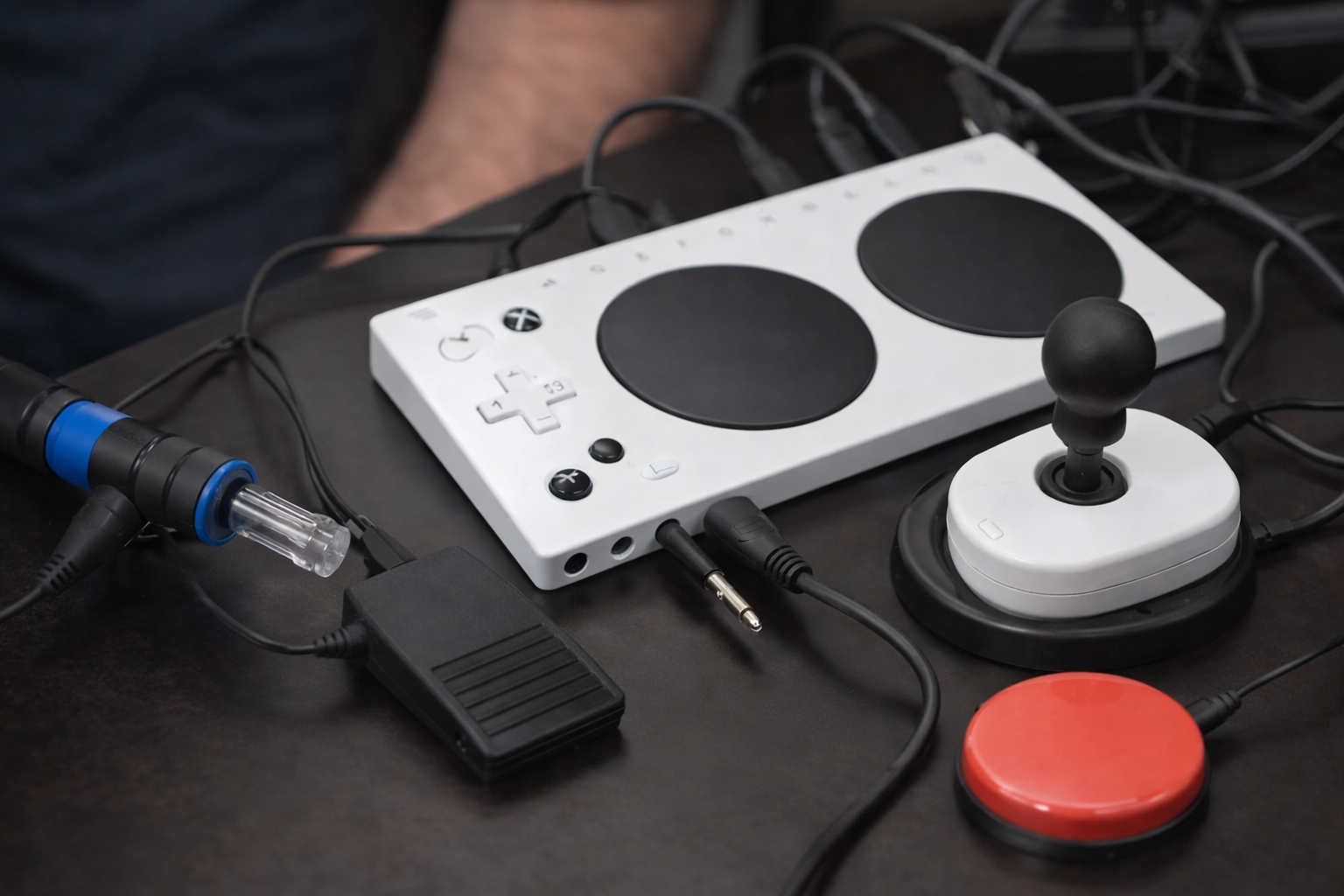
Designed primarily for gamers with limited mobility, the Xbox accessibility controller acts as a unified hub: it connects to external switches, buttons, mounts, and joysticks through nineteen 3.5mm ports and two USB ports, letting players build a setup that is uniquely theirs. A player who can only use one hand, operates a foot pedal, or relies on a sip-and-puff device can route all of those inputs through a single controller that the console recognizes natively.
The XAC is compatible with Xbox Series X|S, Xbox One, and Windows 10/11 PCs via Xbox Wireless, Bluetooth, and USB - and supports the Xbox Accessories app for button remapping and profile switching, with up to three profiles stored on the controller itself.
That said, the Xbox accessibility controller has real limitations when used on its own. The built-in remapping through Xbox Accessories is functional but surface-level - you can swap buttons, but you can't build macros, create combo inputs, fine-tune analog dead zones, or configure turbo settings. For players with complex needs, that ceiling is hit quickly.
This is exactly where controller customization software like reWASD becomes the critical next layer. Where the XAC opens the door to non-standard hardware, reWASD opens the door to non-standard logic - letting you remap any input to any function, build per-game profiles, adjust stick sensitivity without entering in-game menus, and assign multi-step combos to a single button press. The hardware sets the stage; the software writes the script.
Controller Customization: Taking Full Control
Default button layouts are a starting point - not a finish line. For a one-handed player, someone with limited finger dexterity, or anyone using a non-standard adaptive device, the difference between a remapped controller and an out-of-the-box one can mean the difference between playing and not playing at all.
Controller customization is where that gap gets closed. reWASD is built specifically for this: deep remapping support across Xbox, PlayStation, Switch Pro, and a wide range of third-party peripherals - including the Xbox Adaptive Controller and external switches or foot pedals connected to it. Every physical input becomes configurable. Every button can carry a different function, a macro, or a multi-step combo triggered by a single press.
Here's what that looks like in practice. A player with cerebral palsy has reliable control of their left hand and both feet, but limited right-hand dexterity. Their setup: an XAC as the hub, a left-hand joystick for movement, and two foot pedals for aiming and firing. In reWASD, those foot pedal inputs get mapped to right stick movement and the right trigger. A thumb button on the joystick handles reload. Profile switching is assigned to the XAC's built-in profile button - one tap and the layout shifts between games without opening any menu.
That's not an exploit. That's access.
reWASD also allows per-game profiles to load automatically, adjustable dead zones and sensitivity curves, and turbo assignment for actions that require repeated button presses - all without touching a single in-game settings screen.
Best Accessible Games to Try With Your Custom Setup
A well-configured controller is only half the equation - the game on the other end needs to meet you halfway. Fortunately, the list of titles worth playing keeps growing. Can I Play That? - an accessibility-focused review site run by disabled gamers, for disabled gamers - covers exactly this territory and is the go-to resource for evaluating what any game actually offers.
Here are six of the best accessible games to pair with a custom control setup:
Forza Horizon 5 ships with an extensive suite of driving assists - braking, steering, and stability help can all be toggled independently. Paired with the XAC and a reWASD profile, even players with very limited hand mobility can explore a full open-world racing game without compromise.
Celeste is widely cited as a gold standard in accessibility design. Its Assist Mode lets players slow game speed, skip chapters, or enable invincibility - without locking them out of any content or achievements. The message is clear: the game is for you.
The Last of Us Part I (PC/PS5) offers over 60 accessibility settings covering motor, visual, and auditory needs - among the most comprehensive suites in any AAA release to date.
It Takes Two is a cooperative game that naturally distributes input load between two players, making it a strong option for anyone who plays games with a helper, caregiver, or family member sharing the experience.
Sea of Thieves includes colorblind modes, scalable subtitles, and full button remapping - features that layer cleanly on top of a reWASD profile for a genuinely personalized experience.
Hades features a God Mode that incrementally reduces incoming damage each time you die, removing the twitch-reflex ceiling entirely. With remapped controls via reWASD, it becomes one of the most playable action games available regardless of motor ability.
How to Set Up Your Accessible Gaming Rig
Building an accessible setup doesn't require technical expertise - it requires knowing your starting point. Here's how to get there in five steps.
-
Identify your physical needs and constraints. Before buying anything, map out what works and what doesn't. Which hands or limbs are available? Is fatigue a factor? Do you need larger buttons, fewer inputs, or hands-free options? The clearer this picture, the easier every next decision becomes.
-
Choose the right adaptive device. A single large switch works for some; the Xbox Adaptive Controller with multiple peripherals works for others. Match the hardware to the actual physical input you have available - not the other way around.
-
Install reWASD and connect your controller. Download reWASD, plug in your controller or adaptive device, and let the software detect it.
-
Load or create a custom profile. reWASD includes a library of community-made profiles you can load instantly as a starting point. From there, adjust remapping, sensitivity, and macros to fit your specific game and physical setup.
-
Test and iterate. Spend 15-20 minutes in-game with the new profile. Note what still feels awkward, return to reWASD, and refine. Most players reach a comfortable setup within two or three sessions.
The whole process from install to first session takes under an hour - and the result is a control scheme built around you, not around what a hardware team assumed about you.
Gaming accessibility is no longer a feature request - it's a baseline expectation. Every player deserves a setup that works with their body, not against it.
The tools are here. Adaptive devices handle the physical layer, translating whatever movement a player has into usable input. The Xbox accessibility controller provides the hardware hub that brings non-standard peripherals into the console ecosystem. And controller customization software like reWASD ties it all together - turning a collection of devices into a coherent, personalized control scheme that adjusts to the player, not the other way around.
The best game isn't the one with the highest review score. It's the one you can actually sit down and play.
If you're ready to build your setup, try reWASD free and see what full control actually feels like. Already gaming with a custom accessibility rig? Share your configuration directly in the reWASD community - your setup might be exactly what another player needs to find their perfect control scheme.
FAQ
What is gaming accessibility?
Gaming accessibility refers to features, hardware, and software that help players with disabilities or different physical needs enjoy video games comfortably and independently.
What is an adaptive gaming controller?
An adaptive gaming controller is a customizable device designed for players with limited mobility or other physical challenges. It supports alternative inputs like switches, foot pedals, or one-handed controls.
How does the Xbox Adaptive Controller work?
The Xbox Adaptive Controller acts as a hub that connects external buttons, switches, joysticks, and other adaptive devices to Xbox consoles and Windows PCs.
Can I remap controls on any controller?
Yes. Software like reWASD allows players to remap buttons, create macros, adjust stick sensitivity, and customize controls for many controllers and adaptive devices.
Is reWASD good for accessible gaming?
reWASD is widely used for accessibility because it supports deep controller customization, profile switching, turbo mode, and adaptive hardware integration.
Which games have the best accessibility features?
Popular accessible games include Forza Horizon 5, The Last of Us Part I, Celeste, Hades, and Sea of Thieves.
Can accessible gaming setups help one-handed players?
Yes. Many adaptive devices and remapping tools are designed specifically for one-handed gaming, allowing players to move, aim, and perform actions using customized inputs.
Are accessible gaming devices only for people with disabilities?
No. Many gamers use customizable controls for comfort, injury prevention, reduced fatigue, or ergonomic reasons.
Do accessible gaming setups require technical skills?
Not necessarily. Most modern tools, including reWASD, offer visual interfaces and ready-made profiles that make setup simple even for beginners.
You may also like
How to Use Gyro Controls on PC
.png)