reWASD 9.5: Full Steam Controller (2026) Support and New Advanced Feature - Analog Key Control
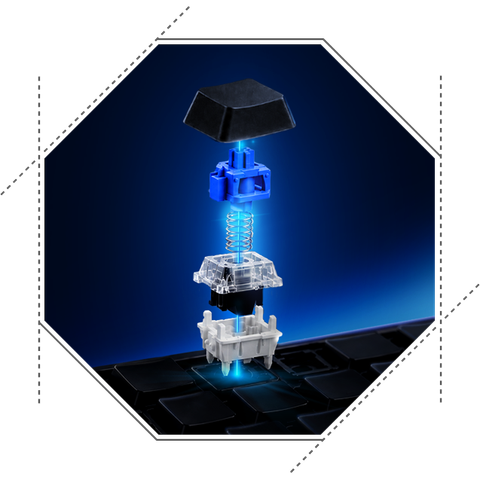
Analog Key Control - meet our new Advanced feature
Analog keyboards give you much more than a simple pressed or released state - and with reWASD 9.5, you can take advantage of that flexibility directly in your configs.
Analog Key Control lets you decide how each press should behave. Switch between digital and analog input, assign different actions depending on how far a key is pressed, set deadzones and actuation points, and fine-tune Rapid Trigger sensitivity. Use a single key for several actions at different press depths, turn WASD into analog movement, or simply make your keyboard respond exactly the way you want.
Please note that Analog Key Control is not available with legacy licenses and is not included in reWASD Basic. To use this feature, you’ll need access to reWASD Advanced.
Analog Key Control lets you decide how each press should behave. Switch between digital and analog input, assign different actions depending on how far a key is pressed, set deadzones and actuation points, and fine-tune Rapid Trigger sensitivity. Use a single key for several actions at different press depths, turn WASD into analog movement, or simply make your keyboard respond exactly the way you want.
Please note that Analog Key Control is not available with legacy licenses and is not included in reWASD Basic. To use this feature, you’ll need access to reWASD Advanced.

Supported analog keyboards
Analog keyboards can handle input differently, so reWASD does not automatically support every analog keyboard on the market yet.
For reWASD 9.5, we tested and fine-tuned Analog Key Control with Wooting 80HE, Wooting Two HE, Razer Huntsman V3 Pro 8KHz, Razer Huntsman V3 Pro Mini and Razer Huntsman V2 Analog.
Based on our current implementation, we expect Analog Key Control to work across the Wooting analog keyboard lineup. For Razer, the models listed above are the ones we have tested and can currently confirm support for. We’ll continue testing additional keyboards and expanding the supported-device list with future updates.
For Razer users: to use a supported Razer keyboard in Analog Mode, Razer Synapse must be installed and running.
For reWASD 9.5, we tested and fine-tuned Analog Key Control with Wooting 80HE, Wooting Two HE, Razer Huntsman V3 Pro 8KHz, Razer Huntsman V3 Pro Mini and Razer Huntsman V2 Analog.
Based on our current implementation, we expect Analog Key Control to work across the Wooting analog keyboard lineup. For Razer, the models listed above are the ones we have tested and can currently confirm support for. We’ll continue testing additional keyboards and expanding the supported-device list with future updates.
For Razer users: to use a supported Razer keyboard in Analog Mode, Razer Synapse must be installed and running.
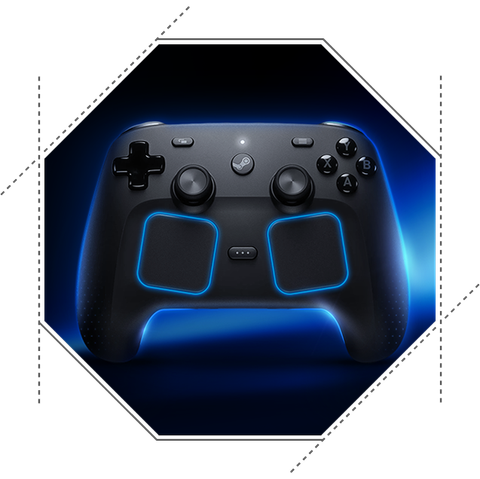
You asked for it - Steam Controller (2026) is now fully supported
No more wondering how to use Steam Controller without Steam. reWASD 9.5 brings full support for the new Steam Controller - often referred to as Steam Controller 2 - so you can use and fully customize it with reWASD outside Steam and without a Steam Machine.
And when we say full support, we mean the whole controller. reWASD gives you access to its dual trackpads, back grip buttons, Grip Sense, capacitive thumbsticks, triggers, gyroscope, accelerometer, and other controls and sensors. Remap them, combine them with reWASD’s customization tools, and build your own configs around the way you want to play.
The new Steam Controller works with reWASD through all three available connection methods - USB, Bluetooth, and wireless dongle. So you can take the controller beyond the Steam ecosystem without giving up access to its full range of inputs and sensors.
And when we say full support, we mean the whole controller. reWASD gives you access to its dual trackpads, back grip buttons, Grip Sense, capacitive thumbsticks, triggers, gyroscope, accelerometer, and other controls and sensors. Remap them, combine them with reWASD’s customization tools, and build your own configs around the way you want to play.
The new Steam Controller works with reWASD through all three available connection methods - USB, Bluetooth, and wireless dongle. So you can take the controller beyond the Steam ecosystem without giving up access to its full range of inputs and sensors.

A few more fixes and refinements
Alongside the major additions in reWASD 9.5, we’ve fixed a number of smaller issues across the app. Custom Crosshair now stays properly centered when using the magnifier in fullscreen mode, while cleared keyboard mappings disappear from the mapping table immediately without requiring you to reopen the config. We also corrected M1/M2 and M3/M4 handling on Flydigi Vader 5 Pro and Apex 5, so the right controls are now recognized and highlighted when used in Shortcuts. An issue affecting gyro behavior on some OEM Wiimotes has been fixed as well.
Another addition is the option to adjust the minimum delay between vibration commands. Sending vibration commands too frequently can increase the load on some controllers - an issue we encountered with Flydigi Gen 5 controllers - so the new setting lets you reduce the command rate when needed.
We also fixed an issue where remapping the DualSense touchpad could cause an unintended touch to be registered in its upper-left corner.
Finally, we’ve made additional under-the-hood improvements and optimizations aimed at overall stability, smoother performance, and more reliable everyday use of reWASD.
Another addition is the option to adjust the minimum delay between vibration commands. Sending vibration commands too frequently can increase the load on some controllers - an issue we encountered with Flydigi Gen 5 controllers - so the new setting lets you reduce the command rate when needed.
We also fixed an issue where remapping the DualSense touchpad could cause an unintended touch to be registered in its upper-left corner.
Finally, we’ve made additional under-the-hood improvements and optimizations aimed at overall stability, smoother performance, and more reliable everyday use of reWASD.