Unleash reWASD 9.3: Expanding Control Across Devices, Inputs, and Platforms

Advanced with a capital “A”: meet Send Input
In reWASD 9.3, we introduce Send Input - a new advanced capability that expands how reWASD works with virtual input through system input APIs.
This improvement is especially relevant for handheld devices and accessibility-focused setups, where on-screen keyboards are often the primary input method. Previously, such virtual keyboards couldn’t be processed by reWASD mappings. With Send Input, on-screen keyboard input can now be recognized and remapped just like other supported input sources.
At this stage, Send Input should be considered an advanced and experimental feature, primarily intended for power users and accessibility scenarios. It serves as an essential foundational step toward broader support for adaptive and virtual input workflows in future updates.
This improvement is especially relevant for handheld devices and accessibility-focused setups, where on-screen keyboards are often the primary input method. Previously, such virtual keyboards couldn’t be processed by reWASD mappings. With Send Input, on-screen keyboard input can now be recognized and remapped just like other supported input sources.
At this stage, Send Input should be considered an advanced and experimental feature, primarily intended for power users and accessibility scenarios. It serves as an essential foundational step toward broader support for adaptive and virtual input workflows in future updates.

ESP32-S3: wi-fi connection now supported
reWASD 9.3 expands support for ESP32-S3 boards, adding both wired and Wi-Fi communication options. Wi-Fi connection is available on the ESP32-S2 also.
It’s important to clarify what Wi-Fi connection means in this context. The ESP32-S2/S3 board remains physically connected to the target device, while reWASD communicates with the board itself over a local Wi-Fi network. This improves flexibility when working with ESP32-based setups while keeping the actual input connection to the target device wired and stable.
To simplify setup, we’ve implemented a step-by-step wizard for ESP32-S3 boards that guides you through Wi-Fi configuration. Please make sure your PC has a Wi-Fi module and that location access is allowed for reWASD, as it’s required to detect available wireless networks during initialization.
It’s important to clarify what Wi-Fi connection means in this context. The ESP32-S2/S3 board remains physically connected to the target device, while reWASD communicates with the board itself over a local Wi-Fi network. This improves flexibility when working with ESP32-based setups while keeping the actual input connection to the target device wired and stable.
To simplify setup, we’ve implemented a step-by-step wizard for ESP32-S3 boards that guides you through Wi-Fi configuration. Please make sure your PC has a Wi-Fi module and that location access is allowed for reWASD, as it’s required to detect available wireless networks during initialization.
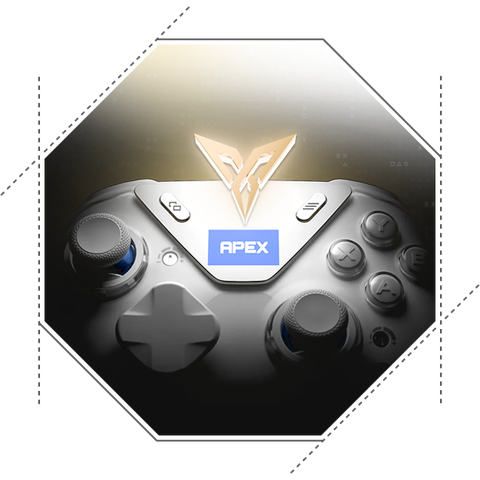
Controller support updates: Flydigi Apex 5 and JoyCon 2 small improvement
In reWASD 9.3, we continue expanding the range of supported controllers. This update adds long-awaited support for the Flydigi Apex 5 controller, extending reWASD compatibility across the Flydigi Apex series.
As with previous Apex models, adaptive triggers are not supported. Other controller features, including gyro input, are supported and can be used within reWASD mappings. To ensure proper operation, please make sure the “Allow third-party apps to take over mappings” option is enabled in the Flydigi Space Station application, as this setting allows reWASD to access the controller correctly.
This release also includes a small but important improvement for Nintendo Joy-Con 2 controllers. While initial support for Joy-Con 2 focused on basic functionality, reWASD 9.3 now allows GR / GL buttons to be remapped when Joy-Con 2 controllers are used in Grip mode, expanding customization options for this configuration.
As with previous Apex models, adaptive triggers are not supported. Other controller features, including gyro input, are supported and can be used within reWASD mappings. To ensure proper operation, please make sure the “Allow third-party apps to take over mappings” option is enabled in the Flydigi Space Station application, as this setting allows reWASD to access the controller correctly.
This release also includes a small but important improvement for Nintendo Joy-Con 2 controllers. While initial support for Joy-Con 2 focused on basic functionality, reWASD 9.3 now allows GR / GL buttons to be remapped when Joy-Con 2 controllers are used in Grip mode, expanding customization options for this configuration.

Fixes and improvements
This update includes several fixes and refinements aimed at improving device compatibility and overall stability. We’ve addressed issues with gyro support on the 8BitDo Ultimate 2 Wireless Controller, ensuring more reliable motion input behavior. Rumble support has also been improved for Nintendo Switch 2 Pro Controller, Joy-Con 2, and Switch 2 GameCube Controller, bringing more consistent vibration feedback across these devices. In addition, we fixed a problem with initializing physical Xbox 360 controllers when connected to ROG Ally devices, which could previously prevent correct detection. Alongside these changes, we’ve made a number of smaller improvements to device detection and system stability.